

When you hear the words green card, what comes to your mind? Of course, you probably think about the colour green. When we see green, especially as a traffic sign, it means access, permission, and “yes, you can go.”
When you travel to America and get a green card, it means you have been given access to stay and live in the country. So, in NYSC, what exactly is a Green Card?
What Is the NYSC Green Card?
The NYSC Green Card is an important document that gives a Prospective Corps Member (PCM) access to the NYSC orientation camp. It is one of the documents you need when reporting to camp, as it contains your personal and registration information.
The Green Card is one of the most important documents every prospective corps member needs. If you want to report to the NYSC orientation camp, you must have your Green Card.
But despite the name, the NYSC Green Card is not actually green.
It is a white A4-sized printout containing detailed information about a PCM. It is made available on the NYSC portal after you have successfully completed your online registration and met the necessary registration requirements.
The first time I heard someone ask, “Have you printed your Green Card?” I was wondering why I needed to print a green card. When I eventually printed mine, I discovered that it was simply an A4 paper.
That is just what the NYSC calls it.
The NYSC Green Card is also referred to as the registration slip or mobilization printout. It serves as proof that you have completed your online NYSC registration.
After completing your online registration, your personal and academic information is captured in the NYSC system. Your Green Card also contains your unique Call-Up Number.
The Green Card is important because it confirms that your registration has been completed and that you have been processed for mobilization.
Green Card vs. Call-Up Letter
It is important to understand the difference between your Green Card and your Call-Up Letter.
- Green Card: Confirms your registration and contains your biodata and Call-Up Number. It becomes available after registration and payment.
- Call-Up Letter: Shows your state of deployment, orientation camp address, and reporting date. It is released later, usually shortly before camp.
Both documents are important when preparing for NYSC camp.
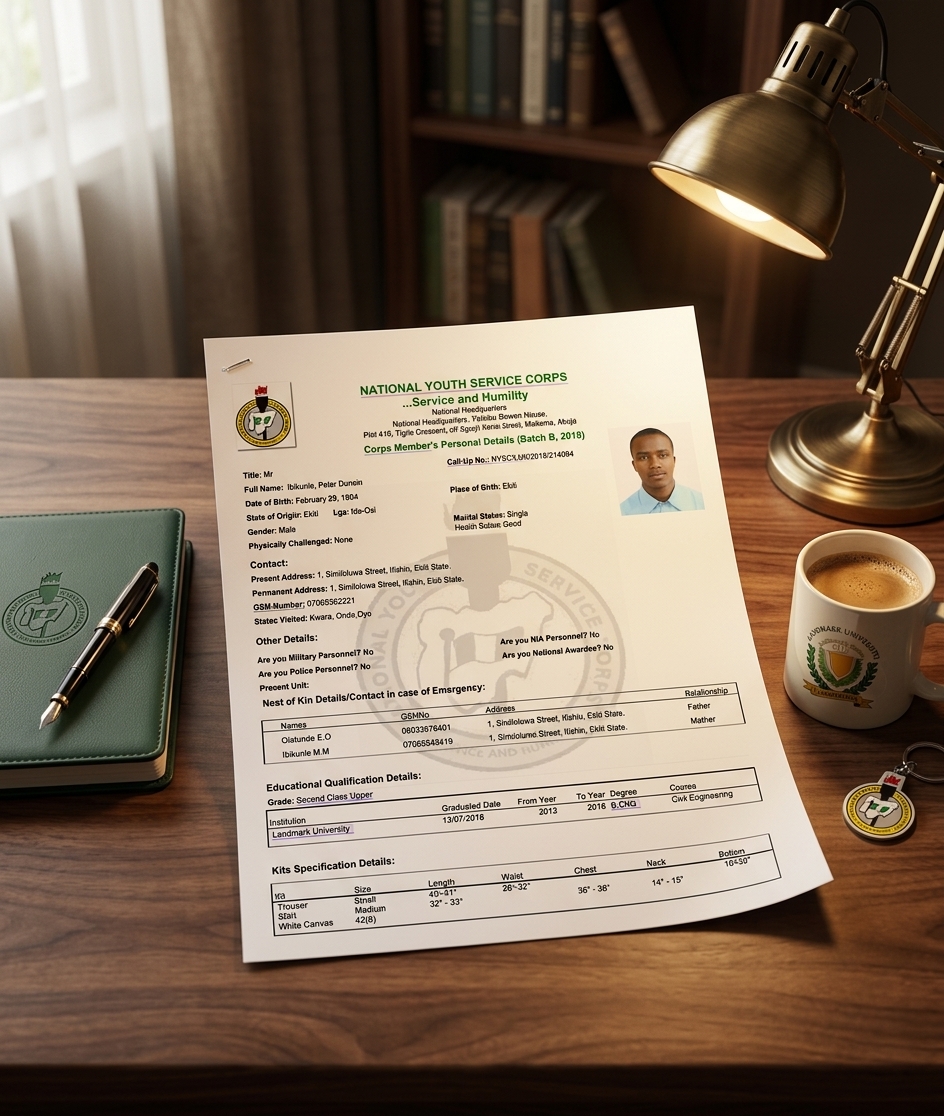
Details of the NYSC Green Card
The information you can find on your NYSC Green Card includes the following:
1. Full Name and Passport Photograph
Your full name should be correctly spelled and properly arranged from the point of registration. Your passport photograph should also meet the required specifications.
2. Date of Birth, Gender and State of Origin
Your date of birth, gender, and state of origin will be displayed on your Green Card.
Make sure this information is correct and reflects your true identity.
3. Call-Up Number
Your Call-Up Number is a unique number assigned to you by NYSC.
For example:
NYSC/ABU/2026/44204
Your Call-Up Number is important, so make sure the details on your Green Card are correct.
4. Institution, Course of Study, Matriculation Number, Class of Degree and Graduation Date
Your Green Card also contains your academic information, including:
- Institution
- Course of study
- Matriculation number
- Class of degree
- Graduation date
For example:
- Institution: Ahmadu Bello University, Zaria
- Course of study: Medicine
- Matriculation number: ABU/2026/8424
- Class of degree: First Class, Second Class, etc.
- Graduation date: Your actual graduation date
Remember that your graduation date is different from the year you signed out.
This information should be properly entered during registration because it will appear on your Green Card.
5. Contact Address, Phone Number and Email
Your contact address, phone number, and email address will also appear on your Green Card.
Make sure your contact information is correct. Your phone number should be active, and your email should be the same one you used during registration.
6. Blood Group and Genotype
Your blood group and genotype are also included.
These details are obtained through the medical test required as part of the NYSC medical fitness process.
7. Next of Kin Details
Your next of kin information will also be displayed.
Make sure the details are correctly entered and properly spelled.
8. Preferred States of Deployment
The preferred states you selected during registration will be displayed on your Green Card.
This is one of the interesting parts of NYSC. You may select places such as Abuja, Lagos, Port Harcourt, or Bayelsa, but you could eventually be posted to another state such as Zamfara, Sokoto, Osun, or Ekiti.
Your preferred states will still be reflected on your Green Card.
9. Kit Sizes
Your NYSC kit sizes are also captured.
This can include your:
- Shirt size
- Trouser size
- Shoe size
- Other relevant clothing sizes
Of course, when people get to camp, some corps members end up swapping shirts, trousers, or shoes because the sizes they receive do not fit perfectly. But the sizes you selected are still captured in your registration information.
10. Batch and Year Information
Your NYSC batch and year information will also be displayed on the Green Card.
11. NYSC Logo and Official Letterhead
The Green Card carries the NYSC logo and official letterhead, identifying it as an official NYSC document.
Requirements Before Printing Your NYSC Green Card
Before you print your Green Card, you should have:
- The email address and password you used during NYSC registration.
- Confirmation that your required payment has been completed.
- Your Call-Up Number visible on your dashboard.
- A stable internet connection.
- A phone, computer, or other suitable device with a browser such as Chrome, Firefox, or another supported browser.
How to Print Your NYSC Green Card
Follow these steps to print your NYSC Green Card:
Step 1: Visit the NYSC Portal
Visit the official NYSC registration portal:
You can access the portal using your phone, tablet, laptop, or desktop computer.
Step 2: Log In
Log in using the email address and password you used during your NYSC registration.
Click Login or Resume, depending on what is displayed on the portal.
Step 3: Close Any Pop-Up or Addendum
An addendum or pop-up may appear after you log in. Close it if necessary to access your dashboard.
Step 4: Locate “Print Slip”
On your dashboard, look for Print Slip. It is usually located around your passport photograph or within your registration information.
Click Print Slip.
Step 5: Open Your Green Card
Your Green Card should open after you click the print option.
Step 6: Check Your Information
Your Green Card will open in PDF format.
Before saving or printing it, carefully check all the information, including your:
- Name
- Passport photograph
- Date of birth
- Call-Up Number
- Institution
- Course of study
- Contact information
- Other personal and academic details
If you notice an error, make sure you understand the appropriate NYSC correction process rather than simply printing the incorrect information.
Step 7: Download and Save the PDF
Download the Green Card and save it somewhere safe on your phone or computer.
You can also send a copy to a trusted person for safekeeping.
Step 8: Print the Green Card
If you do not have a printer, you can take the PDF to a cyber café.
Print the Green Card on clean white A4 paper. It is also useful to have two or three copies available for your NYSC preparations.